Comparison · tested 15 November 2026
TabBar, DocTabs and Office Tab compared
Three tools turn open Word, Excel and PowerPoint files into tabs. Office Tab runs only on Windows. DocTabs is free and runs on the Mac and on Windows. TabBar runs only on the Mac, and it is paid. We make TabBar, so we ran both Mac apps side by side on one Mac and wrote down what each did, including where DocTabs does more.
01
The short answer
- Choose DocTabs if you don't want to pay, if you also work on Windows, or if you want the files of all three applications in one row. It is free, and for everyday switching it does what TabBar does.
- Choose TabBar if you want an app macOS opens without a security override, that sends no usage data, that is sold on the Mac App Store, or that speaks Hebrew. Its bar sits above the Office window and moves the window down, instead of lying over the title bar and ribbon.
- Office Tab is not an option on a Mac: ExtendOffice makes it for Windows only.
02
Side by side
Each row is what we saw on 15 November 2026, on one Mac, with the same files open in both apps. Where TabBar 2.3 changed the answer the same day, the cell says so. Those cells describe the release, and were not part of the side-by-side test.
| Feature | DocTabs 1.0.0 | TabBar |
|---|---|---|
| Price | Free | $39.99 once on the Mac App Store, or $19.90 per Office application direct ($39.90 for all three) after a free trial |
| Runs on | macOS 13 or later, and Windows 10 and 11 | macOS 13 or later |
| Signed and notarized by Apple | No. Ad-hoc signed and not notarized: Gatekeeper refused to open it until the warning was overridden | Yes. Developer ID, notarized, and a separate build on the Mac App Store |
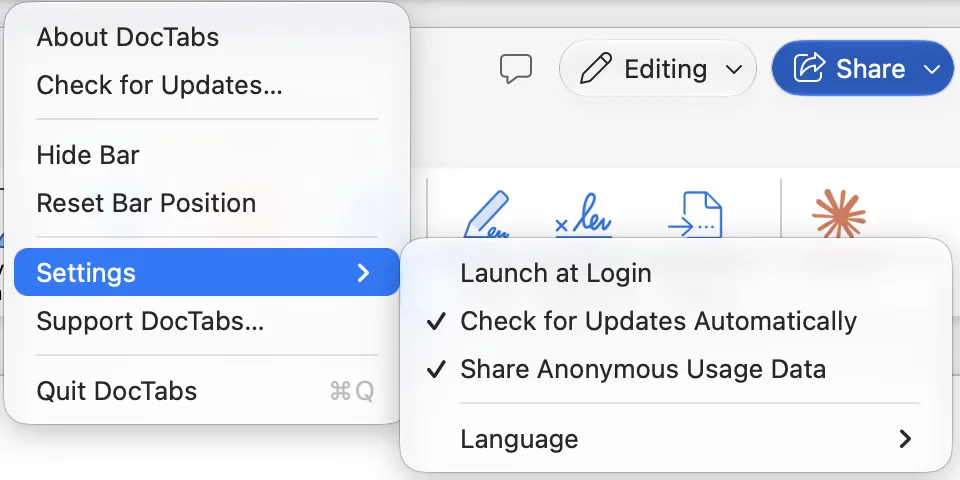
| Usage data | Sent to PostHog, on by default. The first report goes out on first launch, before you have seen the setting | None. The direct download checks its licence with our own licence server |
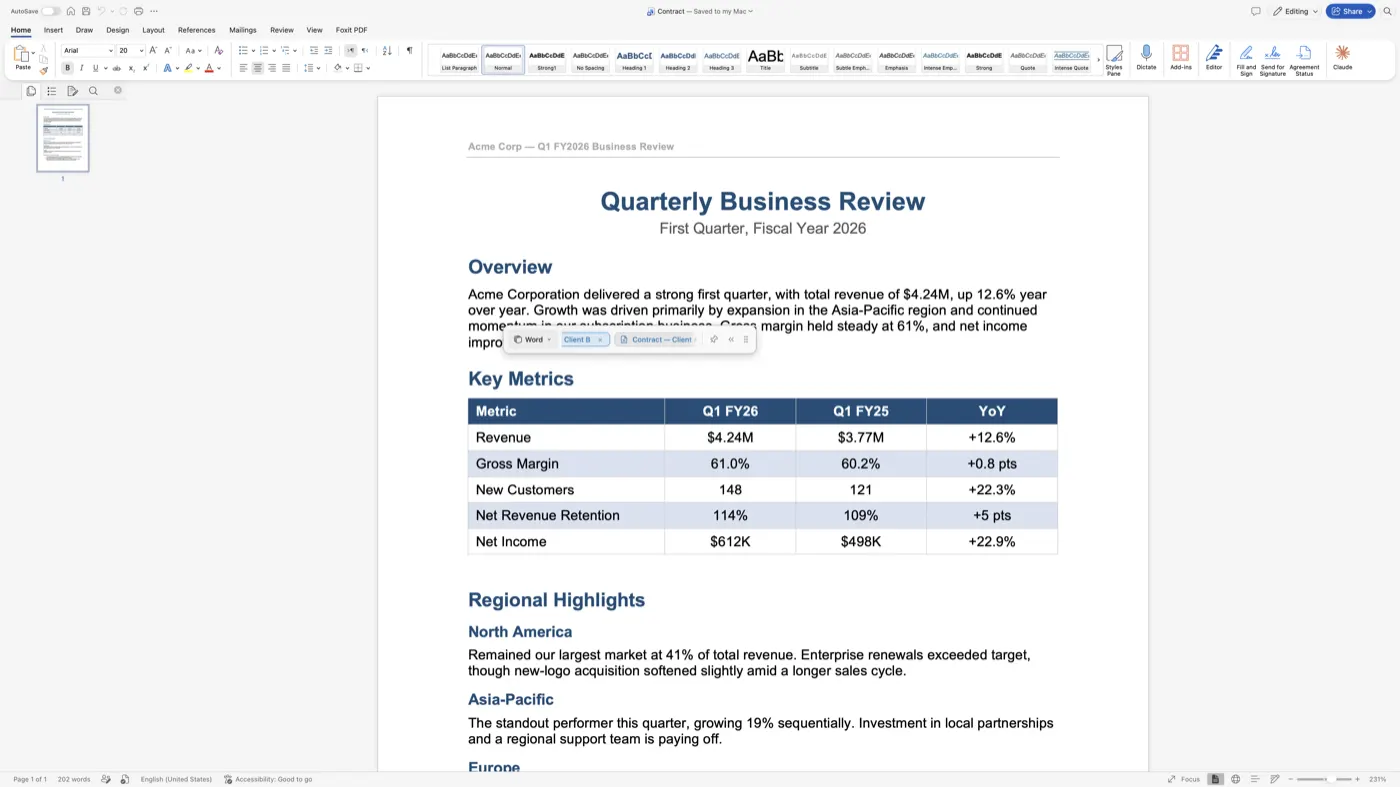
| Where the bar sits | Floats freely. It does not follow the Office window and lies over its title bar and ribbon | Above the Office window, which moves down to make room |
| One click brings the file forward | Yes, in Word, Excel and PowerPoint | Yes, in Word, Excel and PowerPoint |
| Active file marked | Yes | Mac App Store build: yes. Direct download: no in 2.2.3, yes from 2.3 |
| Drag to reorder, order kept after relaunch | Yes | No in 2.2.3. From 2.3: yes, with Reset Tab Order in the tab's menu |
| Two open files with the same name | The folder is shown: “Contract — Client A”, “Contract — Client B” | 2.2.3 showed “Contract” twice. From 2.3 the folder is shown |
| Close a file from its tab | Yes. Word asked whether to save the changes | No in 2.2.3. From 2.3: × on hover, or Close in the tab's menu, with Office's own save prompt |
| Show in Finder | Offered (double-click a tab, then the magnifier), but in the test it closed the document instead, twice | No in 2.2.3. From 2.3: Show in Finder in the tab's menu |
| Tab names | The file name | 2.2.3 showed Word's window title (“Compatibility Mode - …” for a .doc file). From 2.3 the file name |
| Files of all three applications in one row | Yes, with a filter and a count per application | No: the files of the application in front |
| Keep the bar over other apps | Yes (pin) | Show and Hide in the menu; not tested over other apps |
| Collapse the bar | Yes, to a small logo | No; the bar can be hidden |
| Full screen | The bar floats over the document's text | Not tested |
| Languages | 9 — English, German, Spanish, French, Mongolian, Russian, Japanese, Korean, Simplified Chinese. No Hebrew | 4 — English, German, Spanish, Hebrew (right to left) |
| Permission macOS asks for | Automation | Direct download: Accessibility. Mac App Store: Automation |
| Memory at rest | 64 MB, plus WebKit helper processes not counted here | 97 MB |
| More than one display | Not tested | Not tested |
“From 2.3”: TabBar 2.3.0 came out as a direct download on 15 November 2026, after the test. Office Tab is not in the table because it does not run on a Mac.
The Mac App Store update to 2.3 is waiting for Apple's review and will be released when it is approved.
03
Where DocTabs is ahead
- It is free. TabBar is not.
- It runs on Windows as well as the Mac, so if you use both, one tool covers both.
- All three applications in one row. All Documents shows Word, Excel and PowerPoint files together, and the filter counts how many of each are open. TabBar shows the files of the application in front.
- Pin and collapse. A pin keeps the bar over other apps, such as Finder, and the bar folds down to a small logo. TabBar can only show or hide its bar.
- A bar you can put anywhere, at the width you choose, with Reset Bar Position to bring it back.
- Nine languages, among them French, Japanese, Korean and Chinese, which TabBar does not have.
- Less memory for its main process, 64 MB against 97 MB, though DocTabs also runs WebKit helper processes that this figure leaves out.
Before 2.3, DocTabs was also ahead on reordering tabs, folder names for files with the same name, closing a file from its tab, and marking the active file in the direct download. TabBar 2.3 added all four.
04
Where TabBar is ahead
- macOS opens it without an override. TabBar is signed with a Developer ID and notarized by Apple, and a separate build is sold on the Mac App Store, where it runs in a sandbox. DocTabs 1.0.0 is ad-hoc signed and not notarized, and Gatekeeper refused it in our test until the warning was overridden.
- No usage data. TabBar reports nothing about how you use it. DocTabs ships with Share Anonymous Usage Data switched on, and its first report to PostHog goes out on first launch. You can switch it off afterwards.
- The bar does not cover Office. TabBar sits above the window and moves it down to make room. The DocTabs bar floats on its own over the Office title bar and ribbon, and in full screen over the document itself.
- Show in Finder works. In our test the DocTabs magnifier closed the document instead of showing it in Finder, twice, on two files. TabBar 2.3 has Show in Finder in the tab's menu.
- Hebrew, laid out right to left.
05
Office Tab: Windows only
Office Tab, from ExtendOffice, is the name most people search for. It is an add-in that puts tabs inside the Office window, and ExtendOffice makes it for Windows only; there is no Mac version. On a Mac the choice is between DocTabs and TabBar, or the switching that macOS and Office already have: ⌘`, the Window menu and Arrange, explained for Excel.
06
Getting TabBar

TabBar for Office is one app for Word, Excel and PowerPoint: $39.99 once on the Mac App Store, or a free trial as a direct download and then $19.90 per Office application, or $39.90 for all three. No subscription.

07
How we tested, and what we did not
- One Mac running macOS 27 with one 5K display, and Word, Excel and PowerPoint from Microsoft 365.
- The same files open in both apps: two Word documents both called Contract, in folders Client A and Client B, other documents, two workbooks and two presentations. Copies only.
- DocTabs 1.0.0 (build 3), downloaded from the link on doctabs.app and run without installing it. TabBar 2.2.3, the direct download current that morning. The Mac App Store build of TabBar was not run.
- Clicks and drags were made by script, not by hand.
- Not tested: more than one display, TabBar over a full-screen document, and TabBar's bar kept on screen over other apps.
- TabBar 2.3 came out after the test. Its cells describe what the release does; they were not measured beside DocTabs.
Both apps change. If something here is out of date or wrong, write to support@bdtech.app and we will correct it.
Sources
- DocTabs: doctabs.app, and its release v1.0.0, published 24 September 2026, at github.com/doctabsapp/DocTabs-releases.
- Office Tab: extendoffice.com/product/office-tab.html.
- The test: our own, on 15 November 2026, as described above.
Checked 15 November 2026.