
macOS · Microsoft Word, Excel & PowerPoint
TabBar.A tab bar for Word, Excel and PowerPoint on the Mac.
Word, Excel and PowerPoint each list your open files in a Window menu of their own — a list you pull down and read every time you switch. TabBar gives you a row of tabs instead: every open document, workbook and presentation is a tab in a slim bar above the window, and one click brings it forward.
Or buy it once on the Mac App Store: TabBar for Office — $39.99
Features
Switch between open documents in one click
One-click switching
Click a tab and that document comes forward. No Window menu, no Mission Control, no counting positions in an alphabetical list.
A tab for every open file
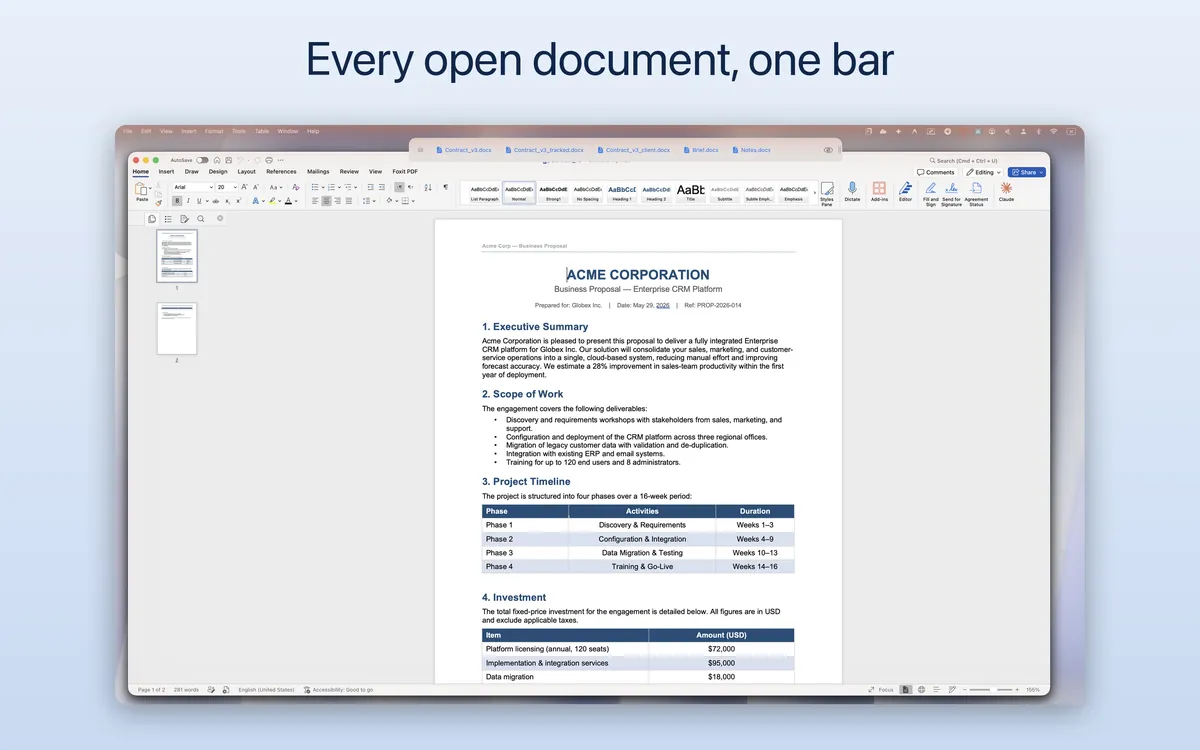
Every open Word document, Excel workbook and PowerPoint presentation becomes a tab in a slim bar pinned above the window.
There with Office, gone without it
The bar appears when Word, Excel or PowerPoint is in focus and stays out of the way otherwise. ⌘H puts it away and brings it back.
The width is yours to set
Drag the grip on the bar's right edge to make it as wide as you need, up to 80% of the screen. It opens at that width next time.
Follows the window
The bar tracks the active Office window and stays anchored above it, so the two never overlap as you move or resize things.
Runs from the menu bar
A status-bar item holds every control. No Dock icon, no window of its own, and nothing installed into Office itself. Launch at login is optional.
Never touches your files
It reads the names of the documents you have open and raises the one you clicked. It does not open a file, read a line of it, change it, or send anything anywhere. No account, no sign-in.
No native Mac alternative
Word, Excel and PowerPoint for Mac have no document tabs, and the leading Office-tabs tool is Windows-only. TabBar fills the gap.
Four languages
English, German, Spanish and Hebrew, with right-to-left layout where it applies.
How it works
One app, a bar in Word, Excel and PowerPoint

In Word
When a Word document (.docx, .doc) is in focus, a tab bar appears above the window listing every open document. Click a tab to switch.

In Excel
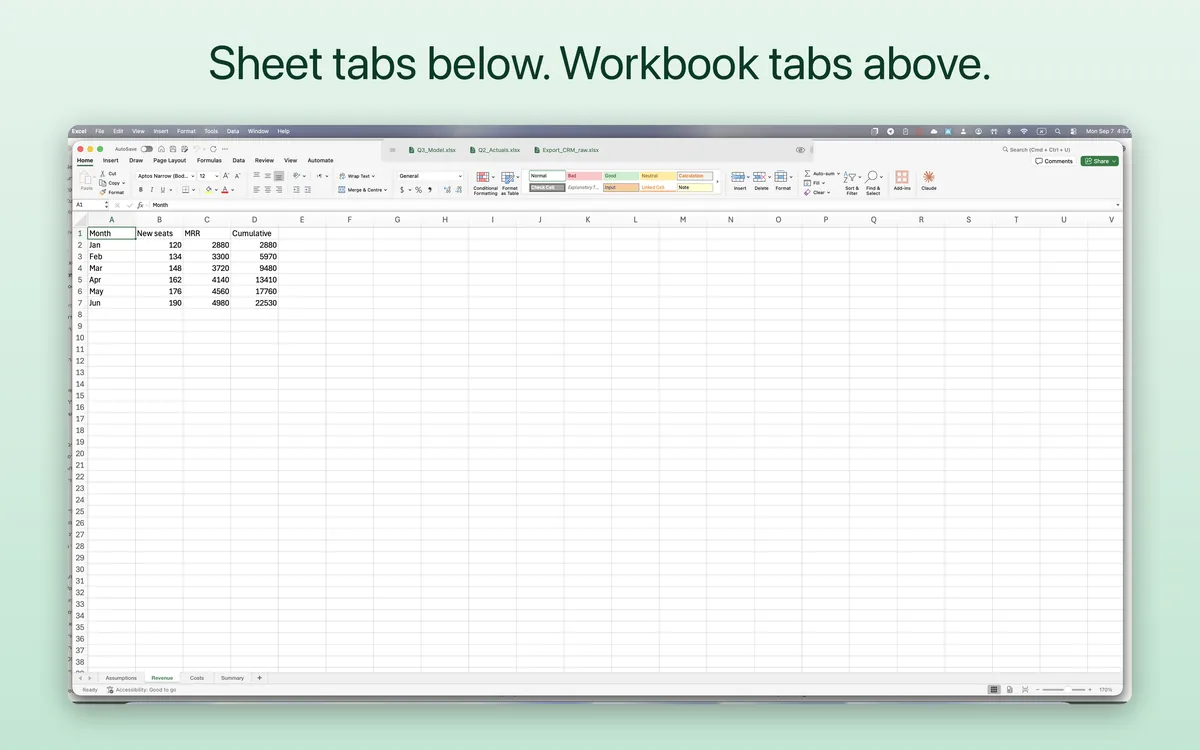
Excel gives you sheet tabs along the bottom of a workbook and none for the workbooks themselves. This is the missing row: one tab per open workbook, above the window.

In PowerPoint
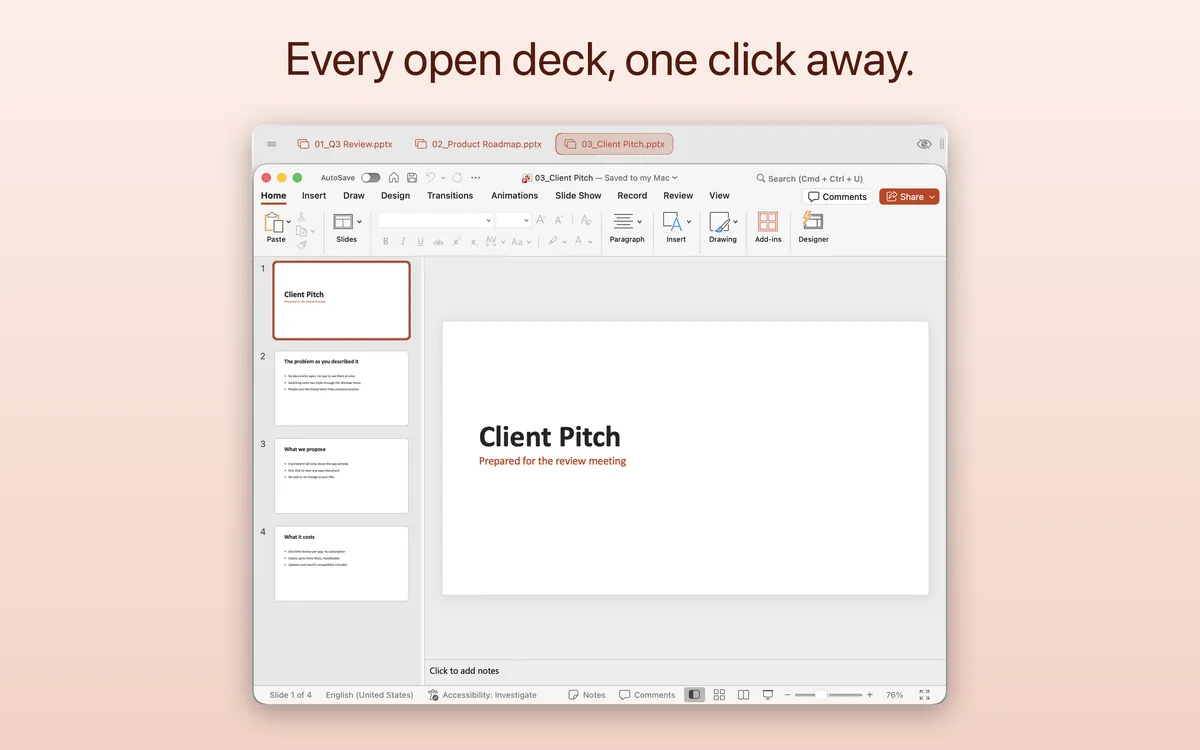
When a PowerPoint presentation (.pptx, .ppt) is in focus, a tab bar appears above the window listing every open presentation. Click a tab to switch.
Pricing
Two ways to get it, neither of them a subscription
Either way it is one app for Word, Excel and PowerPoint. From the Mac App Store it comes with all three; downloaded directly, you try it free for 14 days, then choose what it unlocks.
Mac App Store · one app, all three
$39.99 for all three Office applications
One purchase, and it covers Word, Excel and PowerPoint in a single app. No tab limit, and nothing left to unlock inside it. Not a subscription, and Restore re-applies it on your other Macs. If you bought the unlock while the app was free, you already own this and pay nothing more.

TabBar for Word, TabBar for Excel and TabBar for PowerPoint used to be three separate listings. Since version 2.0 they are one app, and it is the only one on the Mac App Store.
Direct download · free for 14 days, then you choose what it unlocks
$19.90 per Office application · after a 14-day free trial
Word, Excel and PowerPoint are all open for the first 14 days. Then one time, not a subscription: no tab limit, one licence for up to three Macs, transferable between them, with updates and macOS compatibility included.
Or buy a licence first:
The download is free and the same for everyone: it opens with a 14-day free trial of all three Office applications, and when you buy, the app offers the same four choices. Payments are processed by Lemon Squeezy Inc., our authorized reseller and Merchant of Record.
FAQ
Frequently asked questions
What is TabBar?
TabBar is a native macOS app that adds a floating tab bar above Microsoft Word, Excel and PowerPoint. When a Word, Excel or PowerPoint window is in focus, a small bar appears above it showing all your open documents. Click any tab to switch.
Does TabBar support Apple Silicon?
Yes. It runs natively on Apple Silicon (M1, M2, M3, M4) and on Intel Macs.
What is the difference between the Mac App Store version and the direct download?
Both are the same app for Word, Excel and PowerPoint. The Mac App Store edition is bought once for $39.99 and covers all three, and it also marks the tab of the document you are currently in. The direct download can be tried free for 14 days, then lets you choose: one Office application for $19.90, or all three as a bundle for $39.90 — a licence for up to three Macs — and it updates itself from within the app.
How does the purchase work?
On the Mac App Store you buy the app once for $39.99 and everything is there — there is nothing to unlock inside it, and Restore brings it back on your other Macs. With the direct download, you first try the app free for 14 days with all three Office applications open; then you buy one Office application for $19.90 or all three for $39.90, paid once through Lemon Squeezy, our Merchant of Record. You'll receive a licence key by email that activates the app on up to 3 Macs.
What are the licensing details for the direct download?
The direct download is one app, TabBar for Office. A licence unlocks what it was bought for — one Office application, or all three with the bundle — on up to 3 Macs, and can be moved between them; another licence can be added later from inside the app. It includes updates, macOS compatibility and technical support, as a one-time purchase. A licence already bought for TabBar for Word, TabBar for Excel or TabBar for PowerPoint keeps working: it opens the same application inside TabBar for Office.
Does the application launch automatically on system startup?
Yes, you can configure the application to launch automatically when your Mac boots up, from the menu-bar item.
I launched the app but the tab bar does not appear.
The bar only appears when a Word, Excel or PowerPoint window is open and in focus, and only for the applications switched on under Show Bar For in the menu-bar item. It is also hidden if you have toggled it off — press ⌘H, or use Show/Hide in the menu-bar item, to bring it back.
The bar still does not appear when the window is in focus.
It is a permission. The direct download needs Accessibility: open System Settings > Privacy & Security > Accessibility and make sure the app is listed and switched on, adding it manually if it is not there. The Mac App Store build needs Automation instead, and asks for it itself: if macOS has blocked it, the bar shows a Grant Permission button that restores access in two one-time approvals, without quitting Office.
More from BD TECH
Other small Mac apps from the same desk
The developer behind TabBar makes a handful of narrow Mac utilities. These four are the ones that tend to end up on the same machine.
-

Snippet
macOS · iOSThe text you send over and over, on a keyboard you can reach inside any app and in the Mac menu bar. Select an incoming message and a template fills its own fields from it.
Mac App Store -

Click Reminder
macOSA hotkey, a line of text, Enter. The task goes straight into Apple Reminders, so it reaches your iPhone and notifies you there whether or not the app is running.
Mac App Store -

Voynich
macOS · iOSEncrypts files and folders where they sit, replacing each with an AES-256-GCM container under the same name. On the device, behind Touch ID, with no account and a documented format that opens without the app.
Mac App Store -

RSync Pro
macOSKeeps a folder mirrored to a second disk, or to a server of your own over SSH, syncing the moment a file changes. Real rsync, driven from a Mac window.
Mac App Store
Support
Questions or need a hand getting set up?
Email reaches the developer directly.
- TabBar for Office support@bdtech.app